> ## Documentation Index
> Fetch the complete documentation index at: https://chatbase.co/docs/llms.txt
> Use this file to discover all available pages before exploring further.
# REST API Integration
> Complete guide to integrating Chatbase AI Agents using the Chatbase API v2 for custom integrations and applications.
**Standard Plan required.** The Chatbase API v2 is available starting from the Standard Plan. [View pricing →](https://www.chatbase.co/pricing)
## Overview
The Chatbase REST API enables you to integrate AI-powered conversations into any application or workflow. Build custom chat experiences, automate customer interactions, and manage your AI agents programmatically.
API v2 features structured error codes, cursor-based pagination, and real-time streaming via Server-Sent Events (SSE).
**Base URL:**
```
https://www.chatbase.co/api/v2
```
Chat with your AI agents and handle real-time streaming responses
Create, configure, and update AI agents and their training sources
Retrieve conversations and messages from your AI interactions
## Quick Start
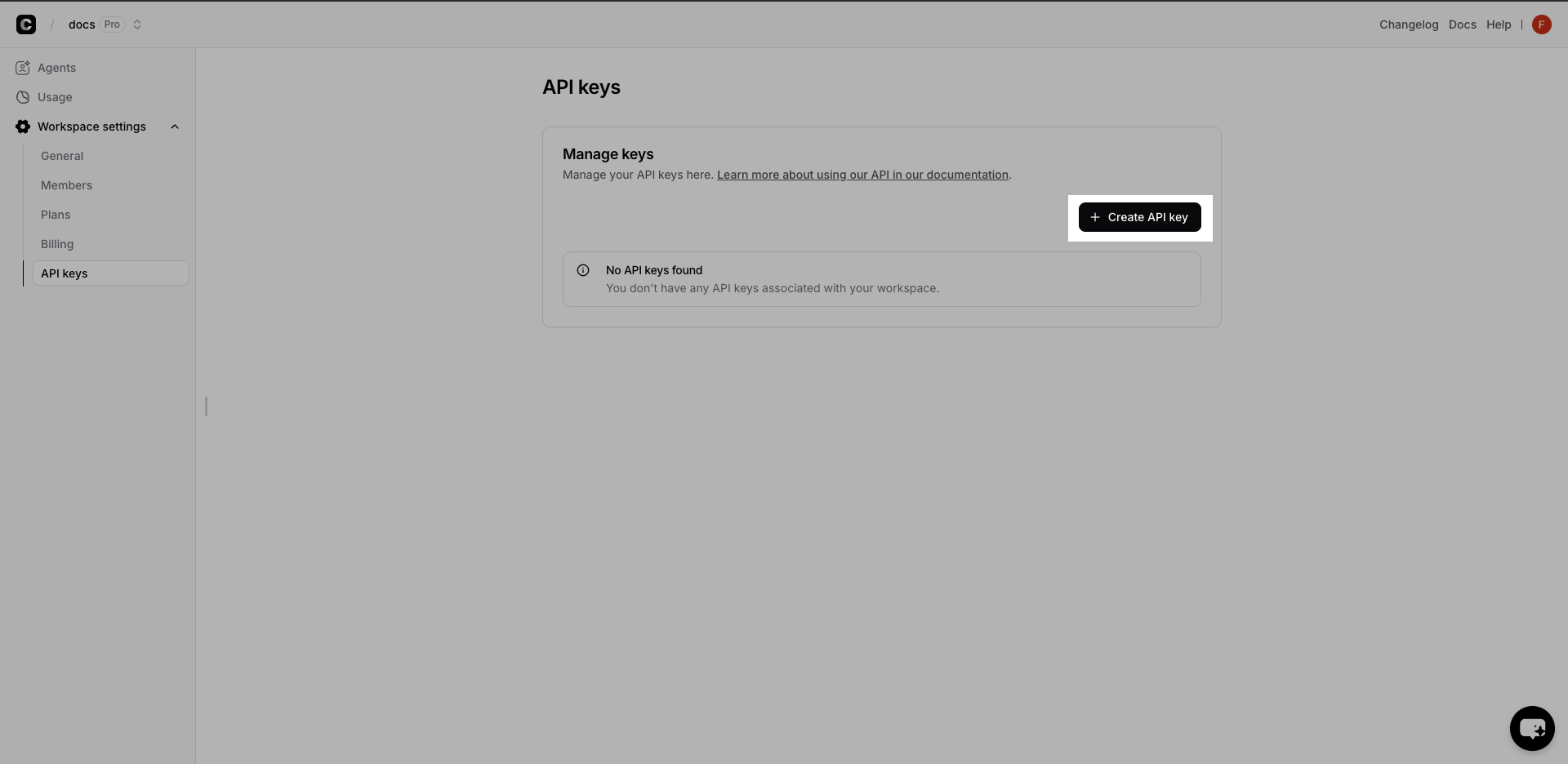 1. Visit your [Chatbase Dashboard](https://www.chatbase.co/dashboard)
2. Go to **Workspace settings** → **API keys**
3. Click **Create API Key** and copy the generated key
Store your API key securely and never expose it in client-side code.
1. Visit your [Chatbase Dashboard](https://www.chatbase.co/dashboard)
2. Go to **Workspace settings** → **API keys**
3. Click **Create API Key** and copy the generated key
Store your API key securely and never expose it in client-side code.
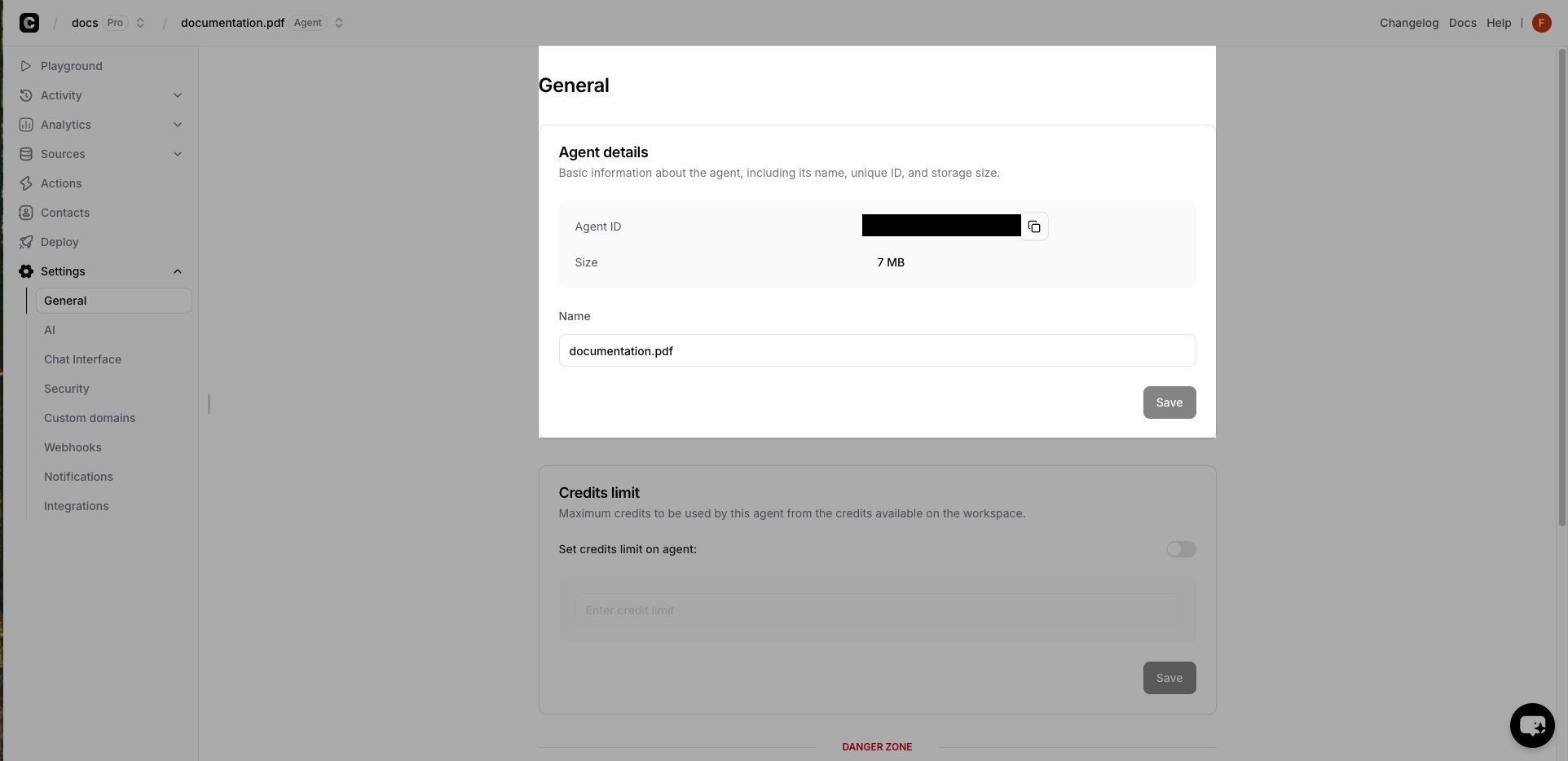 1. Select your AI Agent in the dashboard
2. Go to **Settings** → **General**
3. Copy the **Agent ID** from the **Agent details** card
Test your integration with a simple chat request:
```bash theme={null}
curl -X POST 'https://www.chatbase.co/api/v2/agents/YOUR_AGENT_ID/chat' \
-H 'Authorization: Bearer YOUR_API_KEY' \
-H 'Content-Type: application/json' \
-d '{
"message": "Hello! How can you help me?",
"stream": false
}'
```
**Expected Response:**
```json theme={null}
{
"data": {
"id": "msg_abc123",
"role": "assistant",
"parts": [
{ "type": "text", "text": "Hello! I'm here to help answer your questions and assist with any information you need. What can I help you with today?" }
],
"metadata": {
"userMessageId": "msg_xyz789",
"conversationId": "a1b2c3d4-e5f6-4a7b-8c9d-0e1f2a3b4c5d",
"userId": null,
"finishReason": "stop",
"usage": { "credits": 2 }
}
}
}
```
`stream` defaults to `true` in API v2. Set it to `false` to receive the complete message as a single JSON response.
Conversation history is stored by Chatbase — you don't need to resend previous messages. Pass the `conversationId` from the previous response to send a follow-up:
```bash theme={null}
curl -X POST 'https://www.chatbase.co/api/v2/agents/YOUR_AGENT_ID/chat' \
-H 'Authorization: Bearer YOUR_API_KEY' \
-H 'Content-Type: application/json' \
-d '{
"message": "Tell me more about your pricing.",
"conversationId": "a1b2c3d4-e5f6-4a7b-8c9d-0e1f2a3b4c5d",
"stream": false
}'
```
To associate a new conversation with one of your users, pass a `userId` on the first message. See [User Conversations](/docs/api-v2/user-conversations) for details.
### Chat API Streaming
The [chat API](/docs/api-v2/agents/chat-with-an-agent) streams responses in real time using Server-Sent Events. Each event is a `data:` line containing a JSON object with a `type` field, and the stream ends with `data: [DONE]`. Concatenate the `text-delta` events to build the full reply, and read the `conversationId` from the `finish` event to continue the conversation.
```javascript Node.js theme={null}
// streamer.js (Node.js 18+)
const apiKey = ''
const agentId = ''
const apiUrl = `https://www.chatbase.co/api/v2/agents/${agentId}/chat`
async function readAgentReply() {
const response = await fetch(apiUrl, {
method: 'POST',
headers: {
Authorization: `Bearer ${apiKey}`,
'Content-Type': 'application/json',
},
body: JSON.stringify({
message: '',
stream: true,
// conversationId: '', // omit to start a new conversation
}),
})
if (!response.ok) {
const { error } = await response.json()
throw new Error(`${error.code}: ${error.message}`)
}
const reader = response.body.getReader()
const decoder = new TextDecoder()
let buffer = ''
let conversationId
while (true) {
const { done, value } = await reader.read()
if (done) break
buffer += decoder.decode(value, { stream: true })
const lines = buffer.split('\n')
buffer = lines.pop() // keep any incomplete line for the next chunk
for (const line of lines) {
if (!line.startsWith('data: ')) continue
const data = line.slice('data: '.length)
if (data === '[DONE]') continue
const event = JSON.parse(data)
switch (event.type) {
case 'text-delta':
process.stdout.write(event.delta)
break
case 'finish':
conversationId = event.messageMetadata.conversationId
break
case 'error':
console.error('\nStream error:', event.errorText)
break
}
}
}
console.log('\nConversation ID:', conversationId)
}
readAgentReply().catch((error) => console.log('Error:', error.message))
```
```python Python theme={null}
## streamer.py
import json
import requests
api_key = ''
agent_id = ''
api_url = f'https://www.chatbase.co/api/v2/agents/{agent_id}/chat'
def read_agent_reply():
try:
headers = {
'Authorization': f'Bearer {api_key}',
'Content-Type': 'application/json'
}
data = {
'message': '',
'stream': True,
# 'conversationId': '', # omit to start a new conversation
}
response = requests.post(api_url, json=data, headers=headers, stream=True)
response.raise_for_status()
conversation_id = None
for line in response.iter_lines(decode_unicode=True):
if not line or not line.startswith('data: '):
continue
payload = line[len('data: '):]
if payload == '[DONE]':
continue
event = json.loads(payload)
if event['type'] == 'text-delta':
print(event['delta'], end='', flush=True)
elif event['type'] == 'finish':
conversation_id = event['messageMetadata']['conversationId']
elif event['type'] == 'error':
print(f"\nStream error: {event['errorText']}")
print(f'\nConversation ID: {conversation_id}')
except requests.exceptions.RequestException as error:
print('Error:', error)
read_agent_reply()
```
For the full list of stream events — including client action (tool call) events — see the [Streaming guide](/docs/api-v2/streaming).
## Error Handling
API v2 returns structured errors with a machine-readable `code`:
```json theme={null}
{
"error": {
"code": "RATE_LIMIT_TOO_MANY_REQUESTS",
"message": "Too many requests, please try again later"
}
}
```
Every response includes an `x-request-id` header — include it when contacting support. See [Error Handling](/docs/api-v2/error-handling) for all error codes and [Rate Limiting](/docs/api-v2/authentication#rate-limiting) for limits and retry guidance.
## Performance Best Practices
**Optimization Strategies:**
* Use streaming for chat responses to improve perceived performance
* Reuse `conversationId` for follow-ups instead of starting new conversations
* Cache AI agent responses when appropriate
* Respect the `Retry-After` header when you receive a `429` response
* Use cursor-based [pagination](/docs/api-v2/pagination) when listing conversations, messages, or sources
## 🚀 Try It Live!
Ready to see the magic in action? Dive straight into our interactive playground where you can test every API endpoint, experiment with real responses, and build your integration in real-time.
Test APIs instantly • No setup required • Real-time responses • Copy working code snippets
### Key API Endpoints
Send messages and receive AI responses with streaming support
Create, update, and configure AI agents programmatically
Access chat history and conversation messages
Add and manage the training sources for your AI agents
Explore the full API v2 reference — authentication, streaming, client actions, pagination, and more
1. Select your AI Agent in the dashboard
2. Go to **Settings** → **General**
3. Copy the **Agent ID** from the **Agent details** card
Test your integration with a simple chat request:
```bash theme={null}
curl -X POST 'https://www.chatbase.co/api/v2/agents/YOUR_AGENT_ID/chat' \
-H 'Authorization: Bearer YOUR_API_KEY' \
-H 'Content-Type: application/json' \
-d '{
"message": "Hello! How can you help me?",
"stream": false
}'
```
**Expected Response:**
```json theme={null}
{
"data": {
"id": "msg_abc123",
"role": "assistant",
"parts": [
{ "type": "text", "text": "Hello! I'm here to help answer your questions and assist with any information you need. What can I help you with today?" }
],
"metadata": {
"userMessageId": "msg_xyz789",
"conversationId": "a1b2c3d4-e5f6-4a7b-8c9d-0e1f2a3b4c5d",
"userId": null,
"finishReason": "stop",
"usage": { "credits": 2 }
}
}
}
```
`stream` defaults to `true` in API v2. Set it to `false` to receive the complete message as a single JSON response.
Conversation history is stored by Chatbase — you don't need to resend previous messages. Pass the `conversationId` from the previous response to send a follow-up:
```bash theme={null}
curl -X POST 'https://www.chatbase.co/api/v2/agents/YOUR_AGENT_ID/chat' \
-H 'Authorization: Bearer YOUR_API_KEY' \
-H 'Content-Type: application/json' \
-d '{
"message": "Tell me more about your pricing.",
"conversationId": "a1b2c3d4-e5f6-4a7b-8c9d-0e1f2a3b4c5d",
"stream": false
}'
```
To associate a new conversation with one of your users, pass a `userId` on the first message. See [User Conversations](/docs/api-v2/user-conversations) for details.
### Chat API Streaming
The [chat API](/docs/api-v2/agents/chat-with-an-agent) streams responses in real time using Server-Sent Events. Each event is a `data:` line containing a JSON object with a `type` field, and the stream ends with `data: [DONE]`. Concatenate the `text-delta` events to build the full reply, and read the `conversationId` from the `finish` event to continue the conversation.
```javascript Node.js theme={null}
// streamer.js (Node.js 18+)
const apiKey = ''
const agentId = ''
const apiUrl = `https://www.chatbase.co/api/v2/agents/${agentId}/chat`
async function readAgentReply() {
const response = await fetch(apiUrl, {
method: 'POST',
headers: {
Authorization: `Bearer ${apiKey}`,
'Content-Type': 'application/json',
},
body: JSON.stringify({
message: '',
stream: true,
// conversationId: '', // omit to start a new conversation
}),
})
if (!response.ok) {
const { error } = await response.json()
throw new Error(`${error.code}: ${error.message}`)
}
const reader = response.body.getReader()
const decoder = new TextDecoder()
let buffer = ''
let conversationId
while (true) {
const { done, value } = await reader.read()
if (done) break
buffer += decoder.decode(value, { stream: true })
const lines = buffer.split('\n')
buffer = lines.pop() // keep any incomplete line for the next chunk
for (const line of lines) {
if (!line.startsWith('data: ')) continue
const data = line.slice('data: '.length)
if (data === '[DONE]') continue
const event = JSON.parse(data)
switch (event.type) {
case 'text-delta':
process.stdout.write(event.delta)
break
case 'finish':
conversationId = event.messageMetadata.conversationId
break
case 'error':
console.error('\nStream error:', event.errorText)
break
}
}
}
console.log('\nConversation ID:', conversationId)
}
readAgentReply().catch((error) => console.log('Error:', error.message))
```
```python Python theme={null}
## streamer.py
import json
import requests
api_key = ''
agent_id = ''
api_url = f'https://www.chatbase.co/api/v2/agents/{agent_id}/chat'
def read_agent_reply():
try:
headers = {
'Authorization': f'Bearer {api_key}',
'Content-Type': 'application/json'
}
data = {
'message': '',
'stream': True,
# 'conversationId': '', # omit to start a new conversation
}
response = requests.post(api_url, json=data, headers=headers, stream=True)
response.raise_for_status()
conversation_id = None
for line in response.iter_lines(decode_unicode=True):
if not line or not line.startswith('data: '):
continue
payload = line[len('data: '):]
if payload == '[DONE]':
continue
event = json.loads(payload)
if event['type'] == 'text-delta':
print(event['delta'], end='', flush=True)
elif event['type'] == 'finish':
conversation_id = event['messageMetadata']['conversationId']
elif event['type'] == 'error':
print(f"\nStream error: {event['errorText']}")
print(f'\nConversation ID: {conversation_id}')
except requests.exceptions.RequestException as error:
print('Error:', error)
read_agent_reply()
```
For the full list of stream events — including client action (tool call) events — see the [Streaming guide](/docs/api-v2/streaming).
## Error Handling
API v2 returns structured errors with a machine-readable `code`:
```json theme={null}
{
"error": {
"code": "RATE_LIMIT_TOO_MANY_REQUESTS",
"message": "Too many requests, please try again later"
}
}
```
Every response includes an `x-request-id` header — include it when contacting support. See [Error Handling](/docs/api-v2/error-handling) for all error codes and [Rate Limiting](/docs/api-v2/authentication#rate-limiting) for limits and retry guidance.
## Performance Best Practices
**Optimization Strategies:**
* Use streaming for chat responses to improve perceived performance
* Reuse `conversationId` for follow-ups instead of starting new conversations
* Cache AI agent responses when appropriate
* Respect the `Retry-After` header when you receive a `429` response
* Use cursor-based [pagination](/docs/api-v2/pagination) when listing conversations, messages, or sources
## 🚀 Try It Live!
Ready to see the magic in action? Dive straight into our interactive playground where you can test every API endpoint, experiment with real responses, and build your integration in real-time.
Test APIs instantly • No setup required • Real-time responses • Copy working code snippets
### Key API Endpoints
Send messages and receive AI responses with streaming support
Create, update, and configure AI agents programmatically
Access chat history and conversation messages
Add and manage the training sources for your AI agents
Explore the full API v2 reference — authentication, streaming, client actions, pagination, and more